

 Recharge Account
 Select Payment
The item is sent to the User ID provided during checkout. After delivery, the HaiTopUp page says it cannot be withdrawn, so the UID should be checked before payment.


PUBG Mobile Global Top-Up

Best Price

100% Secure

Fast Delivery
 Select Product

60UC
RM 4.37
RM 4.6
-5%

300+25UC
RM 21.85
RM 23
-5%

600+60UC
RM 43.7
RM 46
-5%

1500+300UC
RM 109.25
RM 115
-5%

3000+850UC
RM 218.5
RM 230
-5%

6000+2100UC
RM 437
RM 460
-5%
Total:RM 0
Price Details
Product Price:RM 0
Payment Fee:+RM 0
Total:RM 0
Product Price:RM 0
Payment Fee:+RM 0
Total:RM 0
Steps For Top Up


How to get your info
Game Introduction and Currency
About PUBG Mobile UC
PUBG Mobile is a free-to-play battle royale game from PUBG Studios and Lightspeed Studios, published globally by Level Infinite. The page lists iOS and Android availability.
UC Uses
- UC means Unknown Cash and is the premium currency in PUBG Mobile.
- UC can be used for the paid Royale Pass track, including Elite Pass and Elite Plus Pass.
- UC can be used to open crates and participate in Lucky Draws.
- UC can be used for outfits, weapon skins, vehicle skins, Mythic Forge items, and premium resource bundles.
- HaiTopUp notes Mega Value Bundle and 10-draw options for lucky spins, events, and crates.
Platform Notes
- Android and iOS versions are listed as supported.
Redemption Note
HaiTopUp notes that active PUBG Mobile redeem codes can be used to claim free items.
Top-Up Help
PUBG Mobile UC Top-Up Guide
PUBG Mobile UC purchases depend on the account details entered at checkout. Prepare the required information first, then check it again before payment.
Before You Buy
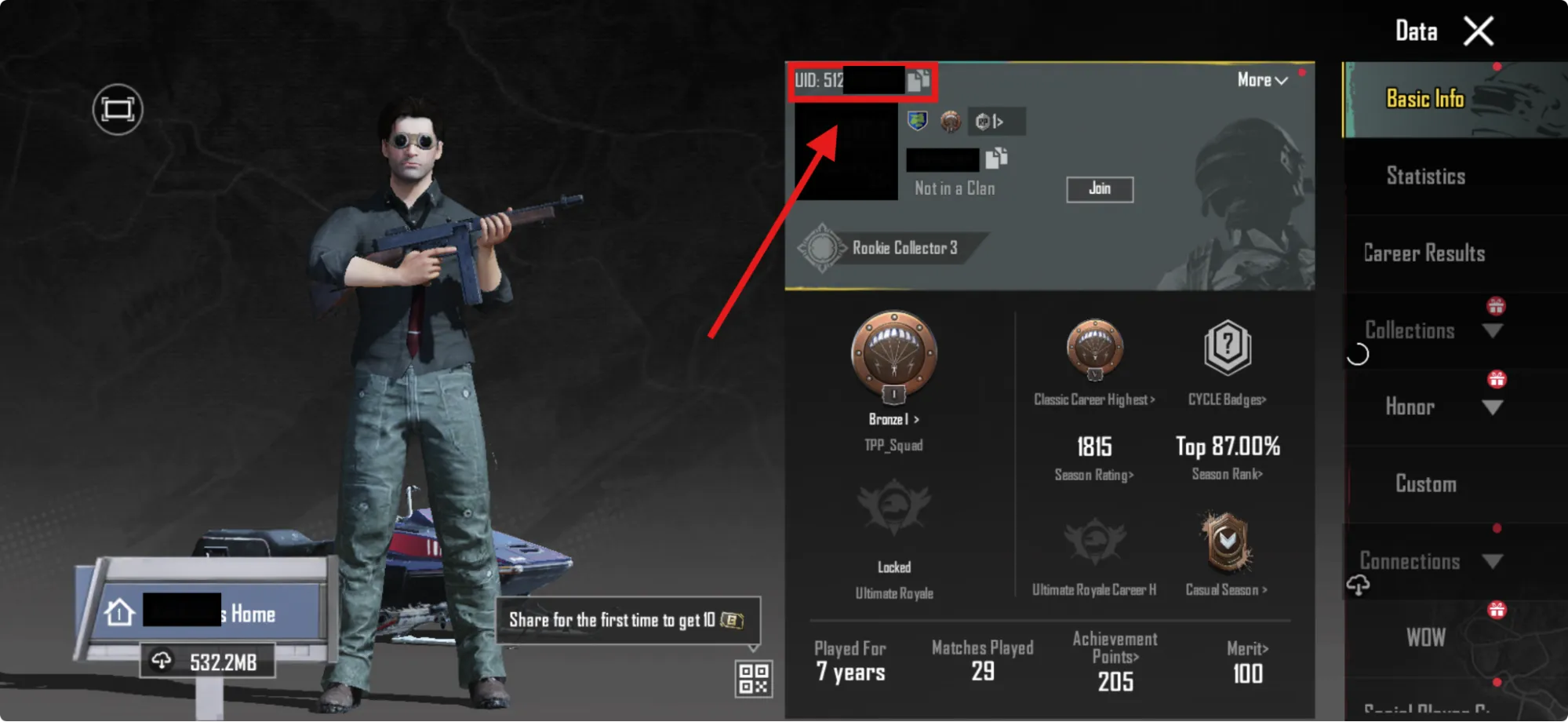
- PUBG Mobile UID / User ID
- email address for the HaiTopUp transaction
- HaiTopUp states PUBG Mobile UC top-up is for PUBG Mobile Global servers.
- HaiTopUp states Taiwan, Japan, and South Korea region servers are not supported.
- Android and iOS versions are listed as supported.
Find Your PUBG Mobile ID
- Launch PUBG Mobile on an iOS or Android device.
- Log in if prompted.
- Tap the username or avatar in the top-left corner of the main page.
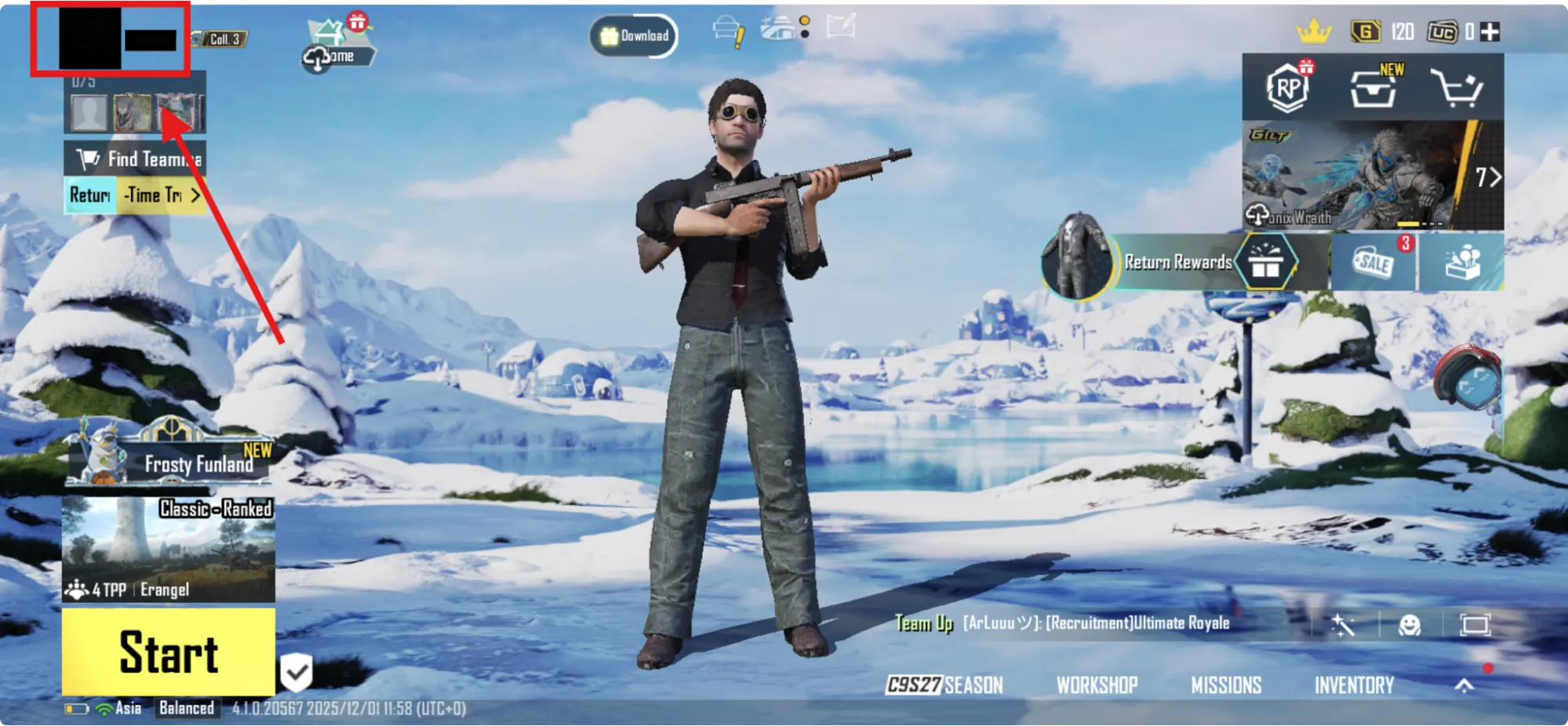
- Find the UID above the avatar picture and username.
Complete the Top-Up
- Choose the UC denomination.
- Enter the PUBG Mobile UID.
- Enter an email address for the transaction.
- Select a payment method and complete payment.
- Wait for the UC to be delivered to the account.
Notes to Check
- Items are delivered to the provided User ID.
- Once delivered, the item cannot be withdrawn.
- HaiTopUp states delivery is usually immediate after purchase.
- The HaiTopUp FAQ says network delays may extend delivery up to 5 minutes.
FAQ
PUBG Mobile UC FAQ
What happens if the wrong UID is entered?
The item is sent to the User ID provided during checkout. After delivery, the HaiTopUp page says it cannot be withdrawn, so the UID should be checked before payment.
Can Japan, Taiwan, or South Korea region players buy PUBG Mobile UC on this page?
HaiTopUp states PUBG Mobile UC top-up is not currently available for Japan, Taiwan, and South Korea region servers.
How long does PUBG Mobile UC delivery take?
The HaiTopUp FAQ says delivery is generally immediate, while network delays may extend it up to 5 minutes. The page also says an email notification is sent after processing.
Local Payment Method












 Officially Verified Game Top-Up Platform

Official Top-Up Center
We offer direct top-up services from official resellers, ensuring the security of your transactions without any hidden fees.

Fast Delivery
We promise to process your orders in real time and deliver in-game currency or other goods to your account ASAP.

Best Deals
Here, you will have the opportunity to purchase games or services at lower prices than retailers.

Customer Support
Product top-ups are non-refundable and non-returnable. Please fill in your user ID carefully, as no refunds or returns can be made after successful payment. If you have any problems, please email: support@haitopup.com